Perform an Easy Demo
EZ Demo Package
Current Release : v2.0 – 2025.01.16

The EZ demo folder contains all necessary information to be able to run easily a demo with MedelOpt+ Exoskeletton /MedelOpt+ VR with/w.o. the BrainBody Platform from AcqKnowledge.

Additional videos to present the experiment (based on MedelOpt+VR with/w.o. the BrainBody Plateform):
– How to set up the participant : This video explains how to set up all sensors, from physiology (BioNomadix) to brain imagery (NIRS/EEG with MedelOpt+VR).
– How to manage recordings in AcqKnowledge : This video show the setting of MedelOpt+ up to the start of the recording with the linkedAcquisition for the BrainBody Platform.
The Experiment
- Runs in VR or in destkop mode.
- Available triggers : thought MedelOpt+ Trigger and/or NDT
Available files
The EZ Demo folder is organized into files detailing the experiment setup (under “MeMoSoft layout” and “Experiment”) and the raw recordings (under “Raw data”).
- Experiment Configuration and Layout (MeMoSoft layout, Experiment): These files specify the technical and spatial details of the recording setup for a general participant.
- Acquisition Layout (
p1_acq_layout.jmms,digpts.txt,p1_3D_data.csv): Contains the 3D coordinates for all sensors and cranial landmarks (Nz, Iz, LPA, RPA), along with head distances (e.g., circumference 55.0 cm). It defines EEG channels and NIRS channels (LED-Detector pairs) with their exact inter-optode distances (e.g., LED2_DET2 at 2.0 cm, LED14_DET4 at 9.1 cm). - Sensor Maps (
p1_sensorsLandmarks_img.png,Go_NoGo_NIRS_EEG_Simplified_Layout.png): Visual representations of the sensor placements, mapped to cortical areas such as the Frontal, Motor, Sensory, Somatosensory, and Visual areas, often using the International 10-20 EEG system nomenclature. - Task Design (
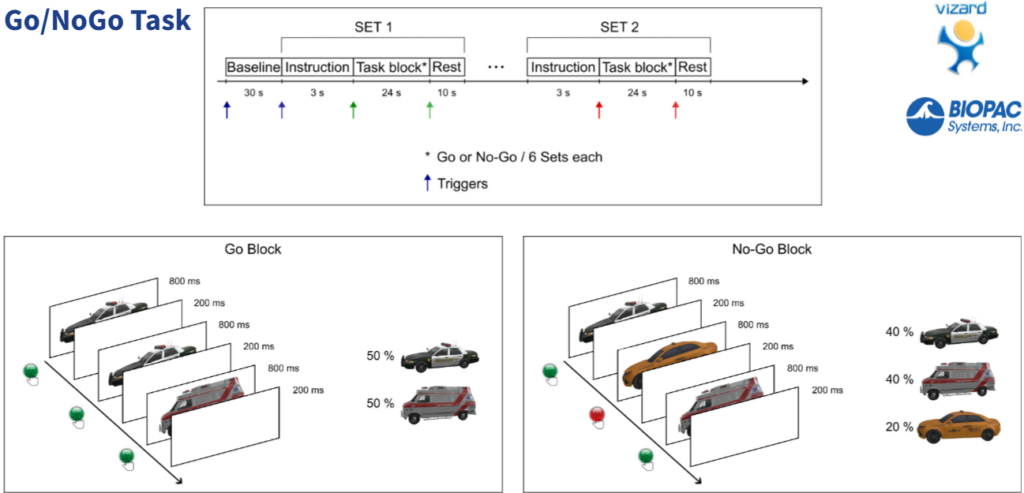
Experimment_design.png): Outlines the “Go/NoGo Task” structure, which includes a baseline period, instruction, and two primary task blocks (Go and NoGo). Stimuli are presented for 800 ms with a 200 ms inter-stimulus interval.
- Acquisition Layout (
- Raw Data Sessions (Raw data/MedelOpt+, Raw data/BrainBody): This section contains the time-series data captured from the sensors during two separate recordings – (1) MedelOpt+ only with EEG and fNIRS; and (2) MedelOpt+ with fNIRS only & MP160 and BioNomadix modules for physiology (PPG, EDA, REPS, ECG and ACC).